



Apple’s latest update iOS 16 is here with a whole load of new features, but people on Twitter are completely obsessed with the lock screen changes.
Today, September 13, Apple released iOS 16 to the public, the latest version of its iOS operating system with major changes and new features, including a customisable Lock Screen, the ability to edit and unsend messages, and more.
iOS 16 New Features
The lock screen changes are one of the biggest new features of the update as it’s completely undergone a whole redesign.
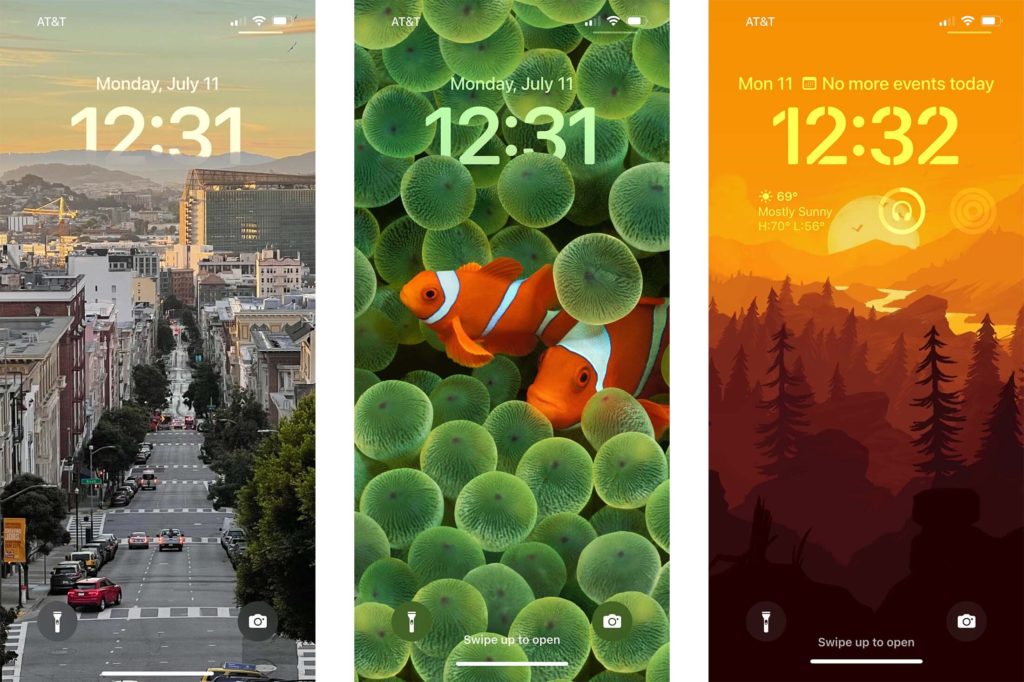
One big change is the ability to customise the lock screen to set multiple lock screens which you can flick between depending on how you’re using your phone – for example, you could set one for when you’re working and a different one for when you’re hanging out with friends.
You can also add new widgets to the lock screen and play about with the font and colours and really personalise it.
Notifications will now pop up from the bottom of the lock screen, this is meant to be able to help the phone user see it at a glance.
Another feature is – and this one is huge if you’ve ever sent a message and had a true Hagrid moment thinking “I shouldn’t have said that – you can unsend messages on the messaging app. As well as this you can edit already sent messages and mark messages as unread – a game changer.
One pointed out as a ‘biggie’ by users is the ‘recently deleted’ and ‘hidden’ images folders are now passcode and Face ID protected.
Twitter loves iOS new lock screen features
With all the amazing new features there’s one many Twitter users have been focused on – the lock screen changes. People love being able to customise it, and make it their own and they’re really loving the edits available.
One user even said the changes available are all they’ve ‘ever wanted Apple to do’ for them.
Which devices are compatible with iOS 16?
The new operating system will of course run on all of Apple’s new phones.
It will also be compatible with the following existing devices:
- iPhone 13i
- Phone 13 Mini
- iPhone 13 Pro
- iPhone 13Pro Max
- iPhone 12
- iPhone 12 Mini
- iPhone 12 Pro
- iPhone 12 Pro Max
- iPhone 11
- iPhone 11 Pro
- iPhone 11 Pro Max
- iPhone XS
- iPhone XS Max
- iPhone XR
- iPhone X
- iPhone 8
- iPhone 8 Plus
- iPhone SE (2nd generation or later)
So if you’ve got an iPhone 7 or earlier you won’t be able to get the update.